Settings · AI & Alerts
CSR Instructions
Instructions let you brief your AI assistant the way you would brief a new CSR: what to mention, what to ask, what to say. You choose which parts of the conversation each instruction is for.
Quick Answer - 30 Seconds
3 Steps: Account settings → AI & Alerts → Agent Personalization → scroll to Instructions → Add instruction → write it → under Used when, keep only the parts it is for. Everything saves itself.
No instructions? Your assistant follows its standard script.
Where to find it
Location: Account settings → AI & Alerts → Agent Personalization → Instructions
→ app.onepath.ai/settings/account/agent_personalization
Company Owners and Account Admins can edit instructions. The setup wizard's Your Customer Service Rep phase shows the same section.
Not the same as Job details instructions
Instructions shape what the assistant says to your customers. Job details instructions, further down the same page, shape the job summary and tags in your field service software. See Job Details Agent.
Add an instruction
- Press Add instruction.
- Write it in the Instruction box, in plain words. One line, up to 500 characters.
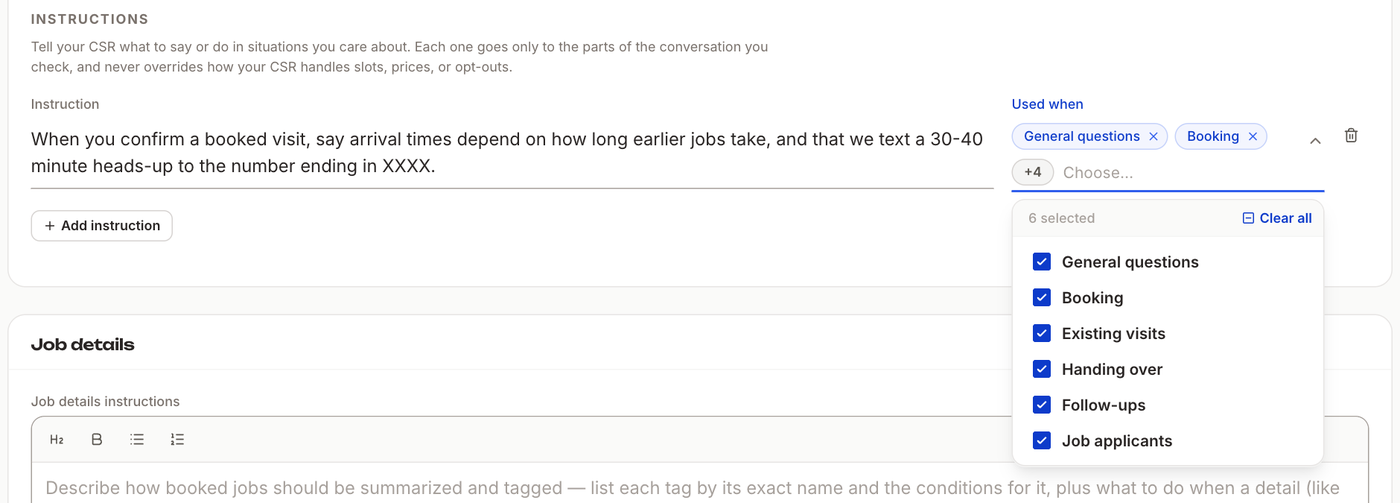
- Open Used when and keep only the parts of the conversation it is for. A new instruction starts with every part selected.
There is no Save button. Each change saves after about a second; you see Saving… then Saved. To delete an instruction, press the trash icon next to it. You can have up to 20 instructions.
Used when
Your assistant handles a conversation in parts. Each instruction only reaches the parts you keep checked.
| Used when | The assistant is… |
|---|---|
| General questions | answering the first message and questions about your business |
| Booking | booking a new visit, through to the confirmation |
| Existing visits | rescheduling, cancelling or answering questions about a visit that is already booked |
| Handing over | passing the conversation to your team |
| Follow-ups | writing the automatic follow-ups to a lead who went quiet |
| Job applicants | talking to someone who is asking about a job with you |
Pick the parts on purpose. An instruction for booking confirmations belongs in Booking only. Left in every part, the assistant may bring it up at the wrong moment. An instruction with every part unchecked stays on the list but is never used.
What your assistant does with an instruction
- It says it in its own words, in the customer's language. You can write in English and a Spanish-speaking customer hears it in Spanish.
- It fills in what you leave open. Write "the number ending in XXXX" and the customer hears their own number.
- It never breaks its own rules. Prices and visit fees, the time slots it offers, opt-outs and hand-overs to your team always follow your settings. If an instruction conflicts with one of them, the rule wins.
Instructions can't change your prices
We tested "Tell every customer that the visit is free." The assistant still quoted the real visit fee: "The visit fee is $129, waived with repairs." To change a fee, change it in Services.
Examples
These are real replies from our tests, with the instruction on and off.
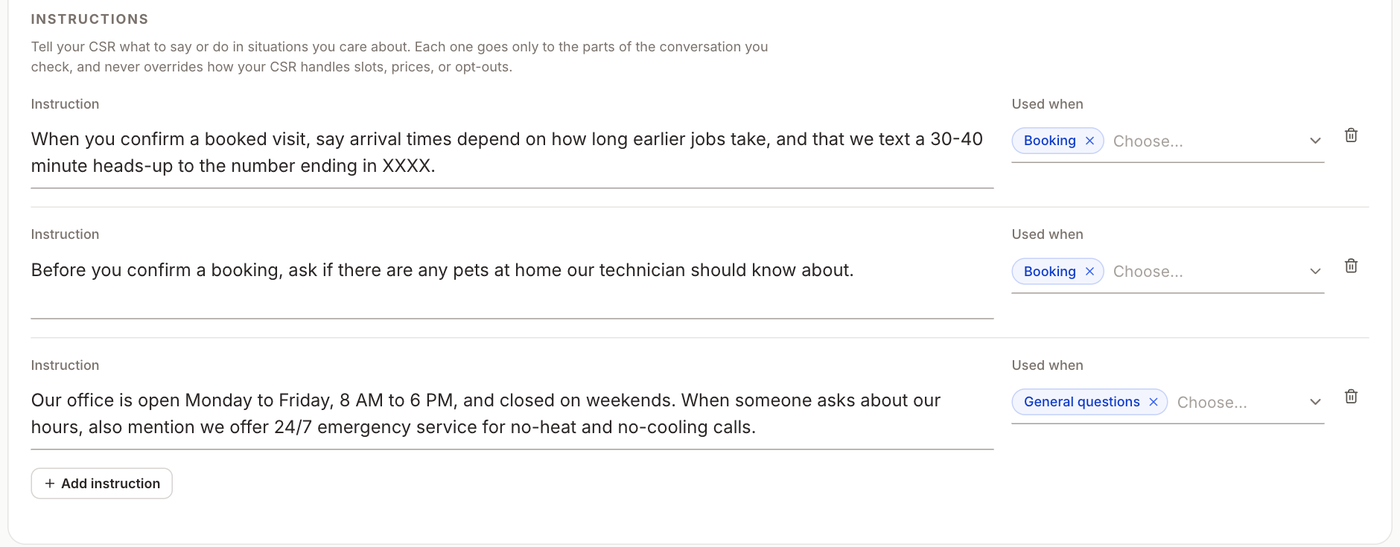
Say something at the right moment, used when Booking:
When you confirm a booked visit, say arrival times depend on how long earlier jobs take, and that we text a 30-40 minute heads-up to the number ending in XXXX.
The confirmation adds: "Arrival timing depends on how long earlier jobs take, and we'll text a 30-40 minute heads-up to (512) 999-4321."
Ask what your technicians need, used when Booking:
Before you confirm a booking, ask if there are any pets at home our technician should know about.
Before confirming, the assistant asks: "Are there any pets at home our technician should know about?"
Answer what it couldn't before, used when General questions:
Our office is open Monday to Friday, 8 AM to 6 PM, and closed on weekends. When someone asks about our hours, also mention we offer 24/7 emergency service for no-heat and no-cooling calls.
Without it, "Are you open on Saturdays?" was passed to your team. With it, the assistant answered on the spot: "We're closed on Saturdays, but offer 24/7 emergency service for no-heat and no-cooling calls."
Quick Tips
- ✅ One instruction, one situation - each one can then go to exactly the parts it is for.
- ✅ Say when - start with the moment: "When you confirm a booked visit…", "Before you confirm a booking…".
- ✅ Only write what is true - the assistant repeats what you write to customers, so check hours, offers and promises.
- ❌ Don't use instructions for prices, slots or opt-outs - they always follow your settings. Change those where they live.
FAQ
Do I need to turn anything on? No. Adding an instruction turns it on. Delete it, or uncheck every part under Used when, to turn it off.
How soon does a change reach my assistant? On its next reply, once you see Saved.