Specific Problems - This Happened
Customer Asks About Pricing
The customer asks "How much?". You quote one price only: the visit fee in the calendar. Every other price goes to the business.
Quick Answer - 30 Seconds
Visit fee: pick a window in the calendar → Service Fee under it, Customer pays in the footer → ask "Are you a member?" → say that number.
Any other price (the repair, a quote, a discount, a refund)? Pass it on:
- OnePath agent: Escalate to someone else → Other → Details → Escalate.
- Account team: Assign teammate → the person who decides prices.
Never read the potential number on the opportunity card. It is not a quote.
The visit fee: the one price you quote
In the calendar, once you pick a window:
- Service Fee: Member 39, Non-Member 99 under each window. Some services show only one of the two.
- Customer pays in the footer, with the same fee for the window you picked.
A visit is the appointment at the customer's address. That fee is what the visit costs. Ask if the customer is a member before you say a number.
The visit fee is $99, or $39 if you're a member.
The number on the opportunity card is not a quote
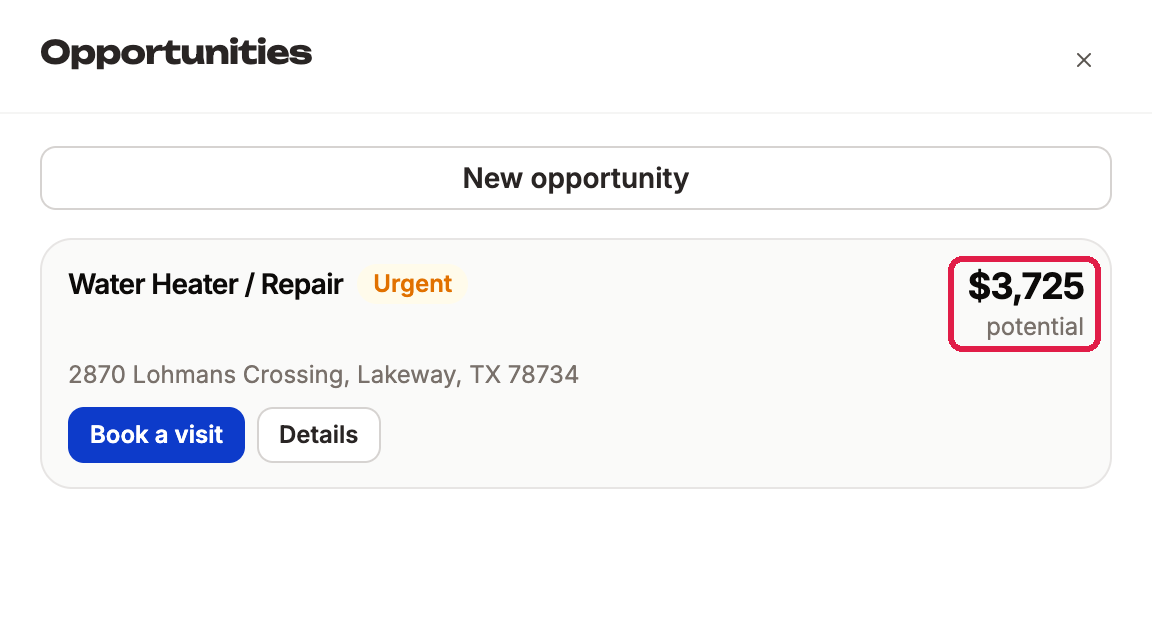
An opportunity is one service the customer may buy, shown as a card under Manage opportunities. Its top-right corner shows one of these:
| You see | It means |
|---|---|
| $3,725 potential | The value the business set for this service. Not a quote: never read it to the customer. |
| $3,725 quoted | The opportunity is closed as Lost (the customer didn't buy, for example after a cancelled visit). Not a price for today either. |
| Not priced yet | No price set for this service. Don't make one up. |
| Included in the plan | A membership visit. The customer's plan covers it. |
No visit fee shows
- Check the card has the right service. Change it in Details if it's wrong. See Opportunities.
- Still no Service Fee? Tell the customer honestly:
I don't have that price in front of me. I'll have the team get back to you with an exact number.
Then pass it on, as below.
They want a quote, a discount or a refund
A repair price, a quote, a discount, a refund and any billing problem are decisions for the business.
If you're a OnePath agent
- Tell the customer: "I'm passing this to the team at [business name]. They'll get back to you with the price."
- Click Escalate to someone else.
- Under What is it about, pick Other: the list has no billing type. Mixed case? Upset customer → Complaint, even if they also want a manager or a price; write every ask in Details. Only a price, refund or bill → Other. Can't book → Follow-up.
- In Details, write what they asked for in one sentence. Example: "Wants a price to replace the water heater."
- Click Escalate.
The task goes to the account's team and leaves your screen. Full steps: Passing a Task On.
If you're on the account's team
Prices yours to decide? Answer it yourself. If not:
- Click Add note and write what the customer asked for, then Save note.
- Click Assign teammate and pick the person who decides prices. Is that your manager, and they're not on the account? Assign it to the account owner.
Hand back works too, where you see it: the task goes back to your team's To Do list. Full steps: Assigning a Teammate.
Let me get the person who handles pricing. They'll get back to you directly.
Quick Tips
- ✅ Quote the visit fee only - from Service Fee or Customer pays.
- ✅ Ask "Are you a member?" before you say it.
- ✅ Write the number you said in a note, so the office sees it.
- ❌ Never read the potential number - it is not a price for the customer.
- ❌ Never promise a discount or a callback time - that's the business's call.